
Build a landing page with AI
A landing page has one job: get a stranger to take one action. Here is what Anticode builds from a single sentence about a coffee subscription, what each section is for, and the parts you still need to write yourself.
The sentence we typed
“A launch page for a coffee subscription called Northside Roast, with pricing and a FAQ.” That's the whole brief. The builder then asks three things: what kind of site it is, which design direction to use, and which must-haves to include. We accepted what it suggested from the sentence, so you can see the defaults.
From that sentence the parser picked out the name, recognised coffee as the subject, chose the landing-page kind from the word “launch”, and switched on four features: pricing and an FAQ because we asked for them, a contact form because every landing page gets one, and payments because the sentence contained the word “subscription”. That last one is worth knowing about. With payments on, pricing buttons point at the payment link you add in Connectors. Until you add one there is no buy button at all, rather than a button that goes nowhere.
What the build contained
| Section | What it's for |
|---|---|
| Header | The name and links to the sections below, so a returning visitor can jump straight to prices. |
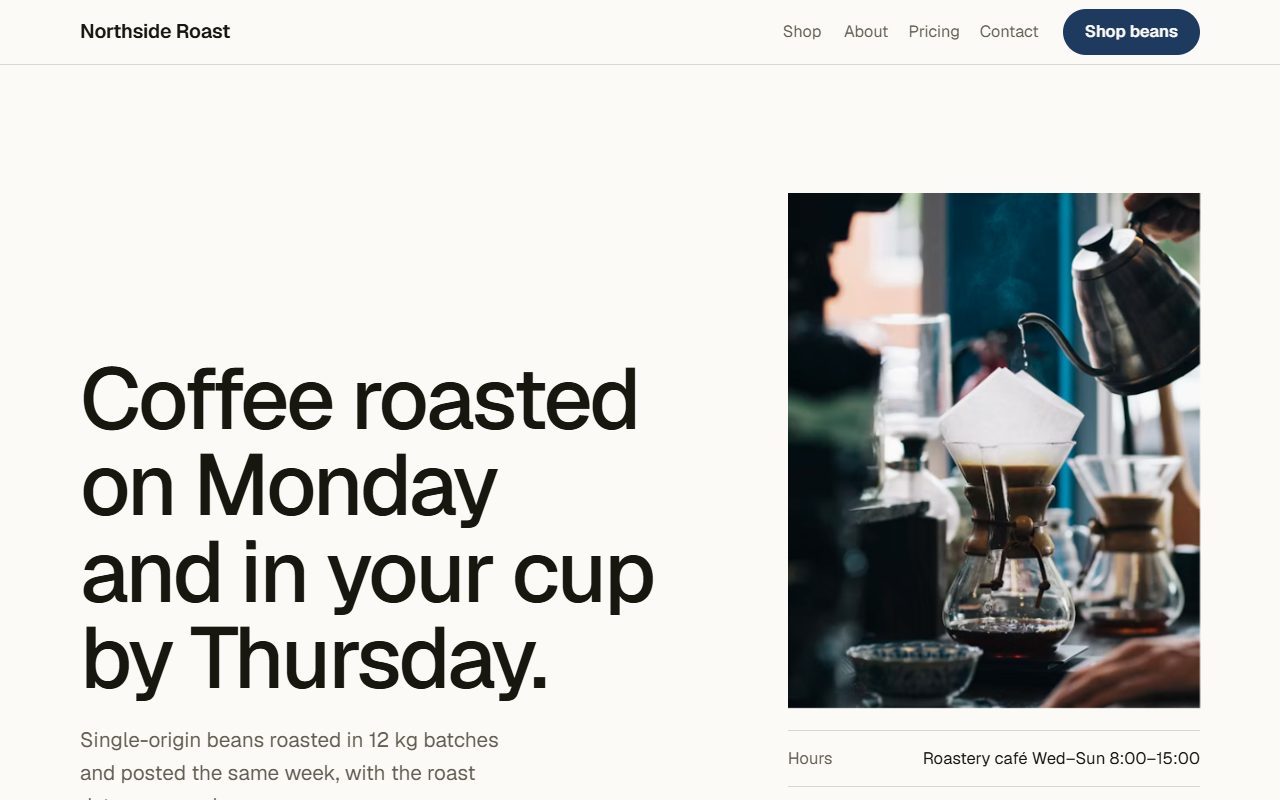
| Hero | One sentence about the offer, one line of detail and one primary action. Sized to its content, not stretched to the full screen. |
| This week's roasts | The product itself. For a subscription that means what arrives in the box, with prices. |
| Why us | A few concrete reasons, written as facts about the business rather than adjectives. |
| How it works | The steps from signing up to the first delivery. Subscriptions live or die on this being obvious. |
| Review | A single customer quote. The generated one is a sample, so replace it with a real one or remove it. |
| Pricing | The plans side by side, with the payment link once you connect it. |
| FAQ | Answers to the objections that stop people subscribing: pausing, cancelling, delivery days. |
| Contact form | A real form. Messages arrive in your Anticode inbox, and can be emailed to you or sent to a connector such as Slack. |
| Footer | Where the business is, when it's open and how to reach it, not just a copyright line. |
The page used the Editorial direction, which sets everything in Geist with ink-on-paper colours. The generated HTML was about 21 KB and contained no script tags. On the build report, all twelve of Sentinel's security checks and all nineteen of the Critic's design checks passed.
What makes a landing page work
A landing page is read by people who arrived from an ad, a post or a search, and who will leave in a few seconds unless the page answers their first question. The structure above follows from that, and it's worth keeping when you edit:
- Say what it is in the headline. The hero should name the thing and who it's for. A clever line that needs the subhead to explain it costs you the visitors who only read one line.
- One action, repeated. Every button on the page should lead to the same next step. Two competing calls to action split attention and usually lower both.
- Prices on the page. Hiding the price behind a form makes people assume it's high. If the price depends on something, show a starting price and what changes it.
- Answer objections before they're raised. The FAQ isn't filler. Collect the questions people email you and put the answers here.
- Proof you can stand behind. One real quote with a name beats three anonymous ones. Never publish the sample review as if it were real.
What you still have to write
The generator fills every section with believable copy so you can judge the layout, but it doesn't know your business. Before you publish, go through the page with the visual editor and replace:
- the roast names, descriptions and prices with your real products;
- the review with a real customer's words and their permission to use them;
- the opening hours and location in the footer;
- anything in the FAQ that doesn't match how your subscription actually works.
Edits made in the visual editor are checked again, so if you add a second typeface or an emoji icon, the Critic will flag it on the next report.
One page or several
A landing page is one page by default, and for a launch that is usually right: every extra page is somewhere a visitor can wander off. If you need more, say so in the sentence. “A four-page site” gives a landing page its services, about, contact and pricing pages, with the header and footer shared between them.
Publishing it
When the checks pass you can publish to a free address on anticode.dev, or connect your own domain on the Pro plan. You can also export the page as a single HTML file or as a Next.js project and host it anywhere. The pricing page lists what each plan includes.