
Build a dashboard with AI
A dashboard is the one Anticode build kind that looks like an app rather than a website. Here is a real one for a bakery, built from a single sentence, with a clear account of what is real in it and what is a sample.
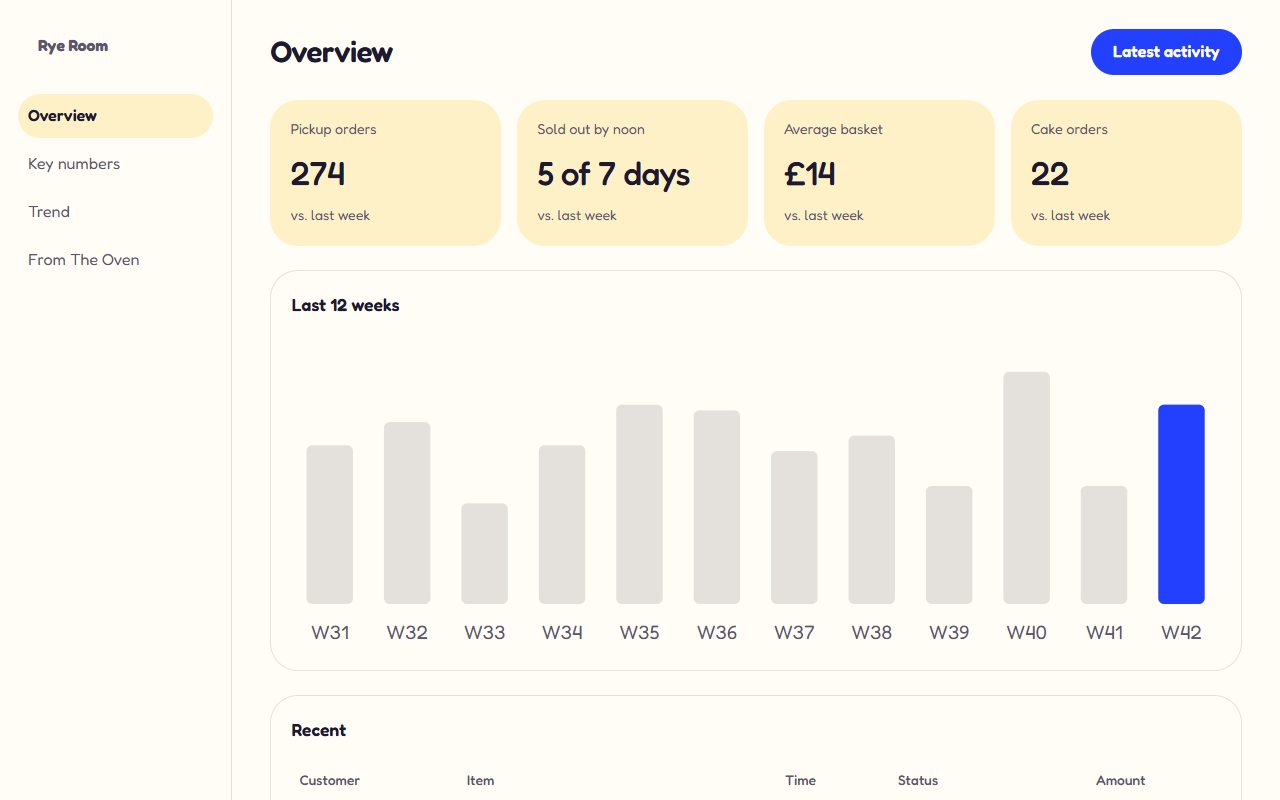
The sentence we typed
“A dashboard to track orders and stock for my bakery called Rye Room.” The word “dashboard” chose the kind, and the bakery chose the Playful direction: Fredoka, rounded panels and a cobalt accent. A dashboard also gets the account sign-up feature by default, because a dashboard usually sits behind a sign-in.
What the build contained
- Sidebar
- Navigation between the overview, the key numbers, the trend and the recent activity, with the current view marked for screen readers as well as visually.
- Header
- The page title and one action, here a link to the latest activity.
- Key numbers
- Four cards with the figures a bakery owner checks each morning: pickup orders, how often the shelves sold out by noon, the average basket and cake orders.
- Chart
- Twelve weeks as a bar chart with the latest week highlighted. It's an inline SVG with a text description of the values, so it reads correctly to a screen reader and prints cleanly.
- Table
- Recent orders with the customer, item, time, status and amount, in a table that scrolls sideways on a phone instead of squashing.
The build was about 19 KB of HTML with no scripts, and it passed all twelve security checks and all nineteen design checks.
What is real and what is a sample
We say this plainly because it's easy to assume otherwise from a screenshot. What Anticode gives you is a finished, accessible design for the dashboard you need, with the right numbers in the right places for your kind of business. That is useful on its own, and it's the part most people get stuck on.
What a generated dashboard is good for
- Deciding what to measure. Seeing four specific numbers for your business is a faster way to agree on what matters than a meeting about metrics.
- A brief for a developer. A working layout with real labels is a better specification than a list of requirements, and the code is clean enough to build on.
- A prototype to show people. Investors, partners or your own team can click through it on a phone.
- A report you update by hand. For a small business, editing four numbers once a week in the visual editor is a perfectly good dashboard.
Connecting it to real data
To make the numbers live, export the project as Next.js. The export is a standard app you own, with a Postgres database through Prisma, row-level security, staff roles, two-factor sign-in and an audit log already in place. Its admin area already reads real bookings, messages and subscribers from the database. Your own figures, such as sales from your till system, need a developer to connect, and the exported code is plain TypeScript a developer can read without learning anything Anticode-specific.
Inside Anticode, a published dashboard can't sign visitors in or show each person their own data yet. If that's the core of what you need, build the export and extend it, or use a tool made for internal apps.
Designing a dashboard people actually read
- Four numbers, not fourteen. If everything is highlighted, nothing is. Pick the figures that change a decision.
- Say what each number is compared with. “274, up from last week” is information; “274” on its own is a puzzle.
- One accent colour, used for one thing. Here it marks the current week. Colour that means nothing teaches people to ignore colour.
- Tables for detail, charts for direction. The chart shows whether things are going up; the table shows which order is late.